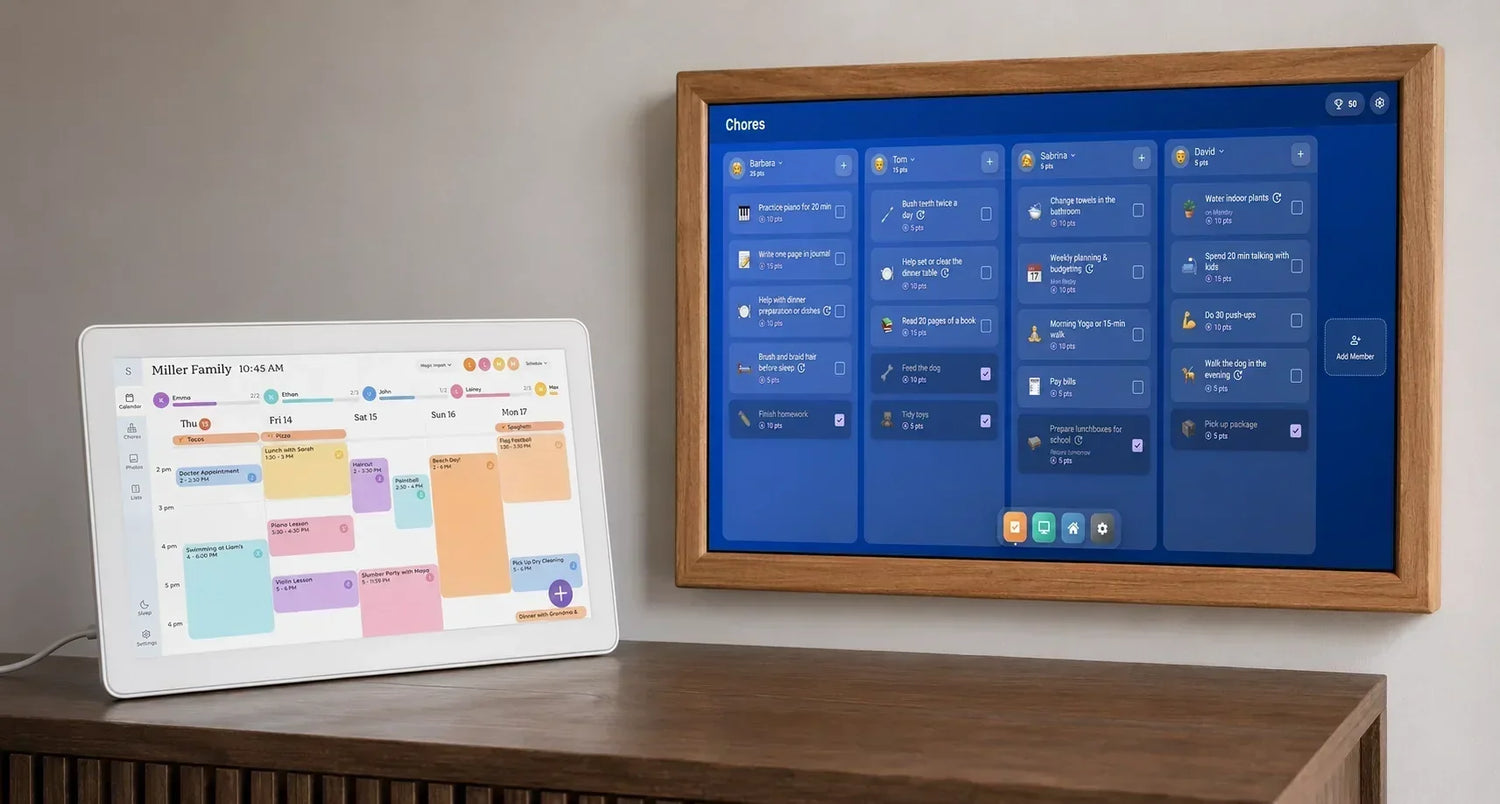
Es gab eine Zeit, da sah fast jeder Familienkalender gleich aus. Ein Papierplaner hing am Kühlschrank, Geburtstage wurden in winzige Kästchen gequetscht, und irgendjemand vergaß unweigerlich, ihn zu aktualisieren. Telefone lösten einen Teil dieses Problems, schufen aber auch ein neues: Der Zeitplan jedes Einzelnen landete auf einem anderen Bildschirm.
Deshalb sind spezielle Familien-Displays in den letzten Jahren so beliebt geworden. Sie bringen alles wieder an einem Ort zusammen, nur dieses Mal aktualisiert sich der Kalender automatisch, Erinnerungen werden mit dem Telefon synchronisiert und jeder im Haus sieht die gleichen Informationen.
Wenn Sie nach einer Skylight-Alternative gesucht haben, ist Ihnen wahrscheinlich etwas Überraschendes aufgefallen. Auf den ersten Blick scheinen die meisten dieser Produkte fast identisch zu sein. Sie alle versprechen, das Familienleben zu organisieren, Kalender anzuzeigen, Aufgaben zu verwalten und volle Terminkalender zu vereinfachen. Wenn Sie jedoch weitere zwanzig Minuten lesen, werden die Unterschiede viel offensichtlicher.
Einige Displays sind für Leute gedacht, die sie einstecken und nie wieder über Einstellungen nachdenken wollen. Andere gehen davon aus, dass Sie es genießen werden, jede Ecke des Bildschirms anzupassen. Keiner dieser Ansätze ist von Natur aus besser – es hängt einfach davon ab, was Sie von dem Gerät erwarten.
Bevor Sie Produkte vergleichen, denken Sie an Ihre Familie
Spezifikationen lassen sich leicht vergleichen. Bildschirmgröße, Auflösung und Prozessorgeschwindigkeit mögen auf einer Produktseite wichtig aussehen, aber sie bestimmen selten, ob Sie das Display sechs Monate später immer noch gerne nutzen werden.
Stellen Sie sich stattdessen ein paar praktische Fragen.
- Nutzen bereits alle den Google Kalender?
- Verlässt sich jemand beruflich auf Outlook?
- Werden Kinder jeden Morgen mit dem Bildschirm interagieren?
- Ersetzen Sie einen Papierplaner, oder hoffen Sie, dass dieses Display auch zum Zentrum Ihres Smart Homes wird?
Diese Antworten sind weitaus wichtiger als ein zusätzlicher Zoll Bildschirmgröße.
Ein gutes Familien-Display sollte nicht von jedem verlangen, seine Art der Lebensorganisation zu ändern. Idealerweise passt es sich an die bereits bestehenden Routinen Ihres Haushalts an.
Skylight: Warum es so beliebt ist
Es ist hilfreich zu verstehen, warum Skylight erfolgreich wurde, bevor man sich die Alternativen ansieht.
Die größte Leistung des Unternehmens war nicht die Erfindung des digitalen Familienkalenders. Es war die Schaffung eines Kalenders, den fast jeder ohne Handbuch verstehen konnte. Die Benutzeroberfläche ist bewusst einfach gehalten, Termine sind aus der Ferne gut ablesbar, und das Verbinden von Kalendern ist nicht einschüchternd, selbst wenn man nicht besonders an Technik interessiert ist.
Diese Einfachheit ist auch der Grund, warum viele Leute schließlich nach einer Skylight-Alternative suchen.
Wenn Familien sich mit der Nutzung eines gemeinsamen Displays vertraut gemacht haben, wünschen sie sich oft mehr, als die ursprüngliche Software bieten sollte. Einige möchten zusätzliche Dashboard-Widgets. Andere hoffen, Kalender mit Smart-Home-Informationen zu kombinieren oder das Layout über die aktuellen Skylight-Angebote hinaus anzupassen. Es gibt auch Funktionen, die nur über das Skylight Plus-Abonnement anstatt der Standardsoftware verfügbar sind, was einige Käufer dazu veranlasst, konkurrierende Produkte zu vergleichen, bevor sie eine Entscheidung treffen.
Nichts davon macht Skylight zu einer schlechten Wahl. Es bedeutet lediglich, dass es nicht automatisch die richtige Wahl für jeden ist.
DAKboard verfolgt einen völlig anderen Ansatz
Unter allen Produkten in dieser Kategorie ist DAKboard wahrscheinlich am einfachsten misszuverstehen.
Die Leute vergleichen es oft direkt mit Skylight, da beide Familienkalender auf einem an der Wand montierten Bildschirm anzeigen können. In Wirklichkeit basieren sie auf unterschiedlichen Ideen.
Skylight verkauft ein fertiges Erlebnis. DAKboard bietet eine Plattform.
Anstatt eine einzige Benutzeroberfläche anzubieten, die jeder Kunde nutzt, lässt DAKboard Sie das Dashboard selbst erstellen. Das klingt zunächst nach Mehraufwand, und fairerweise erfordert es auch mehr anfängliche Einrichtung. Aber nachdem man eine Weile damit verbracht hat, versteht man, warum so viele Benutzer der Plattform jahrelang treu bleiben.
Eine Familie könnte entscheiden, dass der gesamte Bildschirm einem Wochenkalender gewidmet sein soll, weil das alles ist, was sie brauchen. Eine andere könnte das Display in mehrere Bereiche aufteilen und den Kalender neben einer Wettervorhersage, Familienfotos, einer Uhr und einem Nachrichtenfeed platzieren. Beide Dashboards sind gleichermaßen gültig, da keines einer vordefinierten Vorlage folgt.
Das ist wirklich der größte Unterschied zwischen DAKboard und fast jeder anderen Skylight-Alternative auf dem Markt. Anstatt zu entscheiden, welche Informationen auf Ihrer Wand Platz verdienen, können Sie diese Entscheidung selbst treffen.
Es ist auch erwähnenswert, ein häufiges Missverständnis auszuräumen. DAKboard ist keine Android-Kalender-App, die in dedizierter Hardware verpackt ist. Es ist eine Dashboard-Plattform, die auf dem hauseigenen Wall Display sowie unterstützter Hardware wie Raspberry Pi und anderen kompatiblen Geräten laufen kann. Dieser Unterschied ist wichtig, weil er erklärt, warum sich die Plattform erheblich flexibler anfühlt als Produkte, die mit einer festen Betriebsumgebung ausgeliefert werden.
Diese Flexibilität hat natürlich auch einen Kompromiss.
Wer sein erstes Familien-Display kauft, findet Skylight am ersten Tag vielleicht einfacher zu verstehen. DAKboard erwartet ein wenig Neugier von seinen Benutzern. Wenn die Vorstellung, Widgets anzuordnen oder mit Layouts zu experimentieren, anstrengend klingt, fühlt sich ein anderes Produkt möglicherweise angenehmer an. Wenn Sie hingegen gerne Dinge einmal einrichten und sie dann genau so lassen, wie Sie möchten, ist DAKboard eine sehr überzeugende Option.
Hearth Display konzentriert sich auf Gewohnheiten statt auf Funktionen
Hearth Display nähert sich demselben Problem aus fast entgegengesetzter Richtung.
Wo DAKboard fragt: „Was möchten Sie auf Ihrem Dashboard platzieren?“, fragt Hearth: „Wie können wir den alltäglichen Familienalltag weniger chaotisch gestalten?“
Dieser Unterschied zeigt sich fast sofort.
Statt die Anpassung zu betonen, dreht sich Hearth um Routinen. Schulmorgen, Gute-Nacht-Checklisten, wiederkehrende Aufgaben und Familiengewohnheiten erhalten genauso viel Aufmerksamkeit wie Termine im Kalender. Es fühlt sich weniger an wie Produktivitätssoftware und mehr wie etwas, das von Eltern entworfen wurde, die es leid waren, jeden Tag die gleichen Erinnerungen zu wiederholen.
Diese Philosophie wird nicht jedem gefallen. Familien, die ein hochgradig anpassbares Smart Display suchen, finden Hearth möglicherweise etwas restriktiver im Vergleich zu DAKboard. Doch für Haushalte, die einfach nur möchten, dass jeder weiß, was heute, morgen und nächste Woche passieren muss, ist der fokussierte Ansatz wohl eine seiner stärksten Qualitäten.
In vielerlei Hinsicht versucht Hearth nicht, die fortschrittlichste Skylight-Alternative zu werden. Es versucht, die am einfachsten im Alltag zu handhabende zu werden.
Cozyla Kalender+: Mehr als ein Familienkalender
Wenn DAKboard Ihnen eine leere Leinwand gibt, geht Cozyla einen anderen Weg. Das Unternehmen hat versucht, ein Gerät zu entwickeln, das mehrere Haushaltsbildschirme gleichzeitig ersetzen kann, nicht nur den Familienkalender in der Küche.
Im Kern geht es bei Cozyla immer noch um Organisation. Sie können gemeinsame Kalender, Einkaufslisten, Aufgaben und Essensplanung über dieselbe Benutzeroberfläche verwalten. Der Unterschied besteht darin, dass das Erlebnis dort nicht aufhört. Unterstützte Modelle bieten auch Zugriff auf Google Play, wodurch sich das Display viel eher wie ein allgemeines Android-Tablet anfühlt, das für den Familiengebrauch optimiert wurde, als wie ein dedizierter elektronischer Kalender.
Ob das ein Vorteil ist, hängt davon ab, wonach Sie suchen.
Manche Menschen schätzen es, ein Gerät zu haben, das mit ihren Bedürfnissen wachsen kann, anstatt es ein paar Jahre später zu ersetzen. Andere bevorzugen die Einfachheit von Software, die eine Aufgabe außergewöhnlich gut erledigt.
Cozyla liegt irgendwo zwischen diesen beiden Philosophien. Es überfordert neue Benutzer nicht mit endlosen Konfigurationsmöglichkeiten, bietet aber merklich mehr Freiheit als viele dedizierte Familienkalender-Displays.
Eine erwähnenswerte Funktion ist der geteilte Bildschirmmodus. Es klingt nach einer kleinen Annehmlichkeit, bis man sich vorstellt, es den ganzen Tag über zu nutzen. Anstatt zwischen Kalender, Einkaufsliste und Wettervorhersage zu wechseln, können verschiedene Informationen gleichzeitig sichtbar bleiben. Es ist die Art von Verbesserung, die man nach einer Woche nicht mehr bemerkt, weil sie einfach Teil der Routine wird.
Für Familien, die eine Skylight-Alternative vergleichen, ist Cozyla eine Überlegung wert, wenn Flexibilität ganz oben auf der Prioritätenliste steht, aber das Erstellen eines benutzerdefinierten Dashboards von Grund auf nach mehr Arbeit klingt, als Ihnen lieb wäre.
Mango Display ist eigentlich kein Konkurrent – zumindest nicht im üblichen Sinne
Mango Display taucht oft in Listen von Skylight-Konkurrenten auf, obwohl es ein ziemlich anderes Produkt ist.
Im Gegensatz zu Skylight, Hearth oder Cozyla wird Mango Display nicht als dedizierte Hardware verkauft. Es ist eine Software, die kompatible Geräte in digitale Dashboards verwandelt. Dazu gehören Smart-TVs, Tablets, Amazon Fire TV-Geräte und verschiedene andere unterstützte Plattformen.
Dies verändert sowohl die Kosten als auch das Gesamterlebnis.
Wenn Sie bereits ein ungenutztes Tablet oder einen Fernseher besitzen, kann Mango Display eine kostengünstige Möglichkeit sein, ein Familien-Dashboard zu erstellen, ohne einen weiteren Bildschirm kaufen zu müssen. Andererseits finden Leute, die eine All-in-One-Lösung wünschen, die sofort nach dem Auspacken funktioniert, dedizierte Hardware möglicherweise ansprechender.
Die Software selbst konzentriert sich darauf, nützliche Haushaltsinformationen anzuzeigen, anstatt jede bereits verwendete App zu ersetzen. Kalender, Wetter, Uhren, Fotos und andere Widgets können zu Dashboards kombiniert werden, die aus der Ferne gut ablesbar bleiben.
Das macht Mango Display zu einer interessanten Skylight-Alternative, insbesondere für Haushalte, die bereits geeignete Hardware in einer Schublade liegen haben.
Google Nest Hub
Nicht jeder, der ein Familien-Display sucht, braucht tatsächlich einen dedizierten Familienkalender.
Manchmal ist der bessere Kauf ein Smart Display, das bereits so konzipiert ist, dass es in ein bestehendes Ökosystem passt.
Dort macht der Google Nest Hub am meisten Sinn.
Google hat den Nest Hub nie als direkten Skylight-Konkurrenten positioniert, und die Nutzung über ein paar Tage macht das deutlich. Sein Hauptzweck ist es, als Google Assistant Smart Display zu dienen. Der Kalender ist nur ein Teil eines viel größeren Erlebnisses, das auch Smart Home-Steuerungen, Sprachbefehle, Medienwiedergabe und kompatible Google-Dienste umfasst.
Für Haushalte, die bereits in Google Home investiert sind, kann sich das überraschend natürlich anfühlen. Kalenderereignisse erscheinen neben Erinnerungen, Timern, Wetterinformationen und verbundenen Geräten, ohne dass ein weiteres Ökosystem erforderlich ist.
Der Nachteil ist gleichermaßen klar.
Wenn Ihr Ziel lediglich darin besteht, einen Papier-Familienplaner durch einen großen Touchscreen zu ersetzen, den jeder aktualisieren kann, fühlt sich der Nest Hub möglicherweise weniger fokussiert an als Produkte, die speziell für diesen Zweck entwickelt wurden.
Welches fühlt sich im Alltag am besten an?
Nach dem Vergleich von Spezifikationen, Abonnements und Funktionslisten bleibt eine Frage überraschend schwer zu beantworten.
Welches Display fühlt sich eigentlich am schönsten an, um damit zu leben?
Es gibt keine universelle Antwort, aber einige Muster werden offensichtlich.
Skylight ist erfolgreich, weil es fast jeder innerhalb von Minuten verstehen kann. Hearth verdient seinen Platz, indem es sich auf Familienroutinen anstatt auf Technologie konzentriert. DAKboard belohnt Menschen, die es genießen, etwas Einzigartiges zu schaffen, das ihnen gehört. Cozyla versucht, Familienorganisation mit der Flexibilität eines breiteren Android-basierten Erlebnisses zu kombinieren, während Mango Display Käufer anspricht, die lieber bereits vorhandene Hardware wiederverwenden, als einen weiteren dedizierten Bildschirm zu kaufen.
Keiner dieser Ansätze ist objektiv besser. Sie lösen einfach dasselbe Problem aus verschiedenen Richtungen.
Deshalb sollte die Wahl einer Skylight-Alternative nicht mit dem Vergleich von Prozessoren oder Bildschirmauflösungen beginnen. Sie sollte mit einer viel einfacheren Frage beginnen:
Was frustriert Ihre Familie heute am meisten?
Wenn die Antwort vergessene Termine sind, hilft fast jeder moderne digitale Familienkalender. Wenn es verstreute Informationen sind, die auf fünf verschiedenen Apps und Geräten leben, dann werden die Produkte mit umfassenderen Dashboard-Funktionen viel interessanter.
Ein schneller Vergleich
An diesem Punkt ist wahrscheinlich klar, dass es kein einzelnes Gerät gibt, das perfekt für jeden Haushalt ist. Jedes Produkt hat eine etwas andere Vorstellung davon, was ein Familien-Display sein sollte, und das spiegelt sich sowohl in der Hardware als auch in der Software wider.
|
Produkt |
Am besten geeignet für |
Zu beachten |